
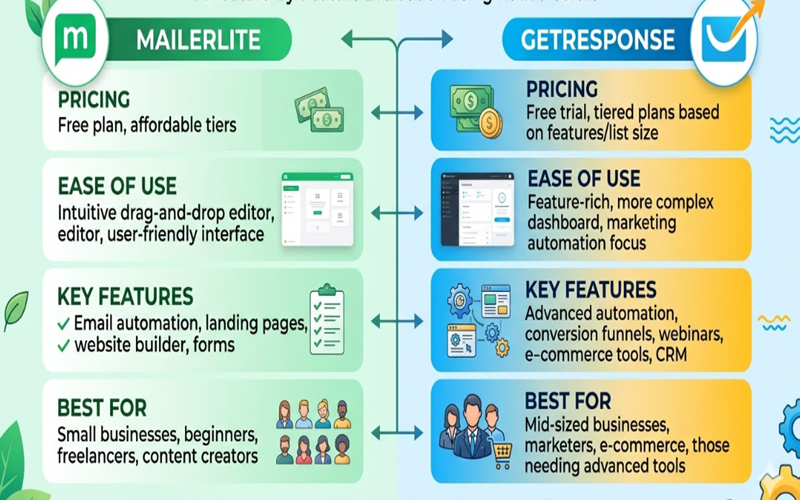
Selecting an email marketing tool in 2026 is a critical decision for growing businesses. The MailerLite vs GetResponse comparison is common, as both platforms now offer advanced AI automation, robust page builders, and comprehensive e-commerce integrations.
These platforms target different user needs. One emphasizes a minimalist, user-friendly interface for quick campaign launches, while the other offers a comprehensive marketing suite with webinar hosting and advanced sales funnels. This comparison reviews their 2026 features, pricing, and performance to help you choose the best solution for your business growth.
Table of Contents
Ease of Use & User Interface
For many beginners, the user interface (UI) is a key factor when choosing between MailerLite vs GetResponse. Both platforms focus on simplifying email marketing, but each offers a distinct navigation experience.
MailerLite: The King of Simplicity
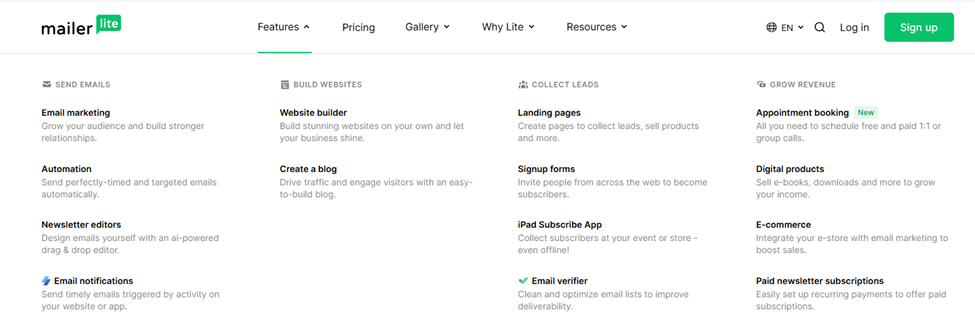
MailerLite is widely regarded as one of the most beginner-friendly platforms in 2026. Its clean, minimalist interface helps users avoid confusion from excessive menus. The dashboard clearly presents key functions such as campaigns, subscribers, and forms.
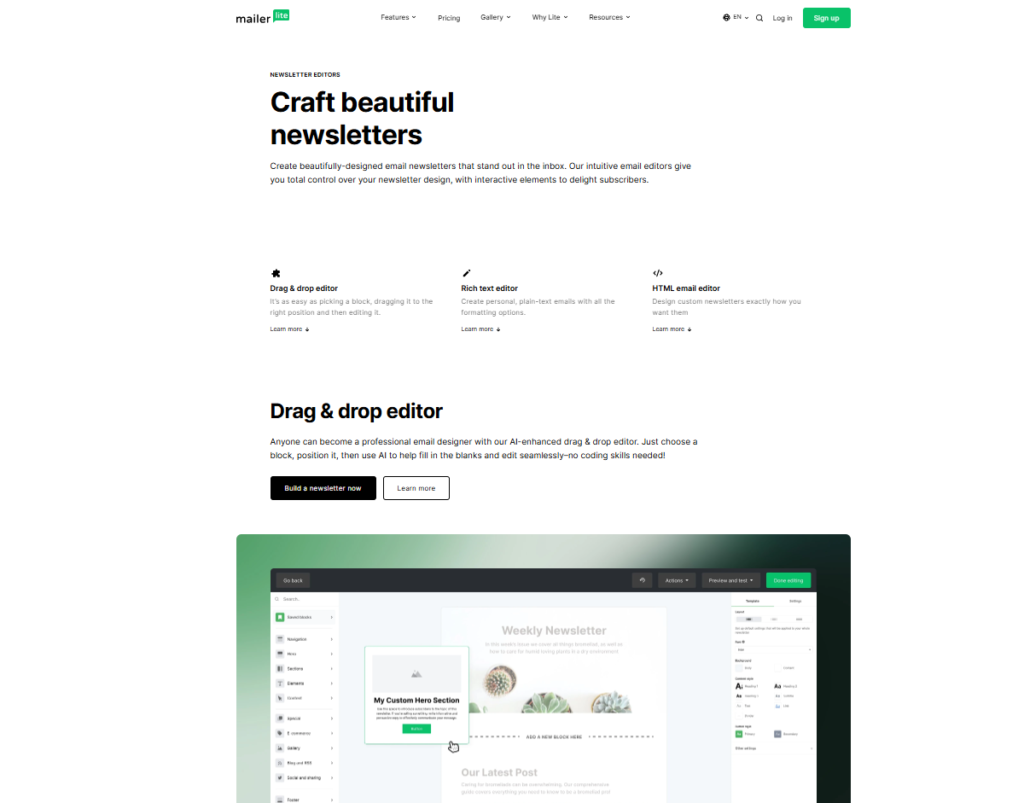
The drag-and-drop editor is responsive and precise, with an intuitive side panel for style adjustments. Users can create professional newsletters in under 10 minutes without coding.
GetResponse: Advanced Features with a Learning Curve
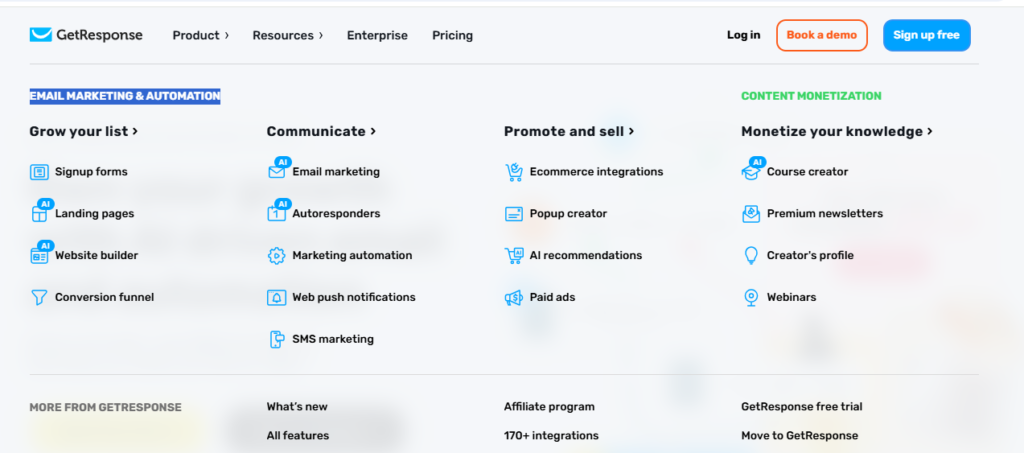
GetResponse offers a comprehensive marketing suite. Advanced features such as webinars, a full CRM, and conversion funnels contribute to a more complex interface.
The 2026 update to GetResponse improved UI modularity, but new users may still need to navigate several menu layers to access specific settings. For experienced users, the platform’s depth can justify the initial learning curve.
Usability Verdict
MailerLite is ideal for users seeking a straightforward tool for quick email campaigns. GetResponse is better suited for those who need a comprehensive platform and are willing to invest time in learning its features.
Email Editor & Design Templates
The design phase is critical in distinguishing brand identity when comparing MailerLite vs GetResponse. Both platforms provide robust drag-and-drop builders, yet they address distinct creative requirements. Users may select between utilizing pre-designed templates for efficiency or constructing customized interactive experiences, depending on their technical proficiency.
MailerLite: Modern, Clean, and Interactive Features
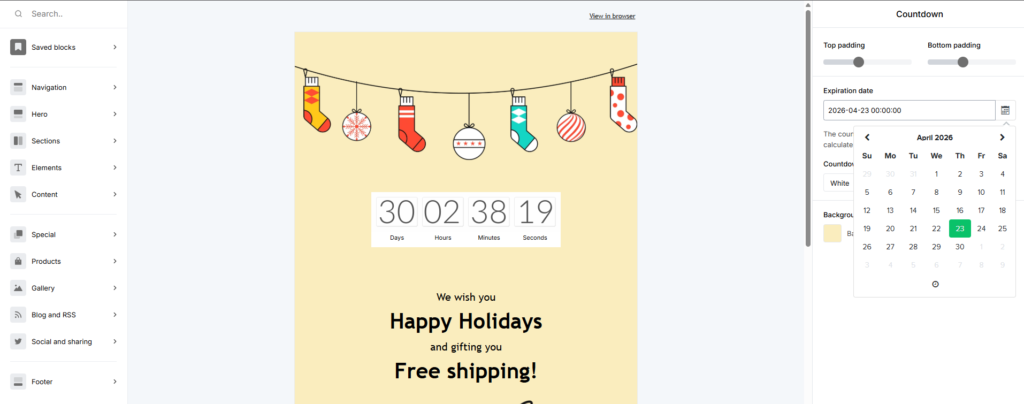
MailerLite’s email editor is recognized for its block-based approach. Beyond basic text and images, MailerLite offers distinctive interactive blocks that are uncommon in comparable tools. As of 2026, these features include integrated survey blocks, quizzes, and countdown timers that can be incorporated directly into newsletters.
Although MailerLite’s template gallery is smaller than that of GetResponse, the available templates are of notably high quality. Each template is characterized by a modern, minimalist, and contemporary design. A notable feature is the AI Writing Assistant, which is integrated into the editor and assists in generating headlines or revising body copy to align with brand tone.
GetResponse: The Powerhouse for Visual Storytellers
GetResponse features a traditional yet highly capable drag-and-drop creator. The platform provides access to over 200 professionally designed templates spanning multiple industries. For specialized needs such as flash sales or webinar invitations, GetResponse offers a wide selection of ready-made designs.
A significant advantage of GetResponse is the AI Email Generator. This tool constructs complete emails, including layout, images, and copy, based on a single prompt regarding the intended goal and target audience. Furthermore, GetResponse provides access to a library of over 2 million free stock images, eliminating the need to source images externally.

The Verdict on Design
For users seeking interactive elements such as RSVP buttons and surveys without reliance on third-party applications, MailerLite is preferable. Conversely, those prioritizing rapid workflows through AI-generated layouts and access to an extensive library of industry-specific templates may find GetResponse more advantageous.
Email Automation & Workflows
Automation represents a critical component of effective email marketing. A comparison between MailerLite vs GetResponse reveals distinct approaches to workflow complexity and scalability. As of 2026, both platforms have integrated artificial intelligence to expedite the creation of automation flows, yet their capabilities differ significantly for businesses seeking to scale.
MailerLite: Simplicity and Efficiency
MailerLite’s automation builder is designed for speed and clarity. It employs a straightforward, vertical workflow that allows users to add steps such as “Wait,” “Condition,” or “Action.” This structure is well-suited for standard sequences, including welcome series, birthday discounts, or basic lead magnet deliveries.
In 2026, MailerLite introduced Multi-trigger Automations within its Advanced plan, enabling up to three distinct entry points for a single workflow. Additionally, the launch of the Model Context Protocol (MCP) allows integration with AI assistants such as ChatGPT to analyze workflow performance and provide optimization suggestions directly within the application.

GetResponse: Advanced Automation Capabilities
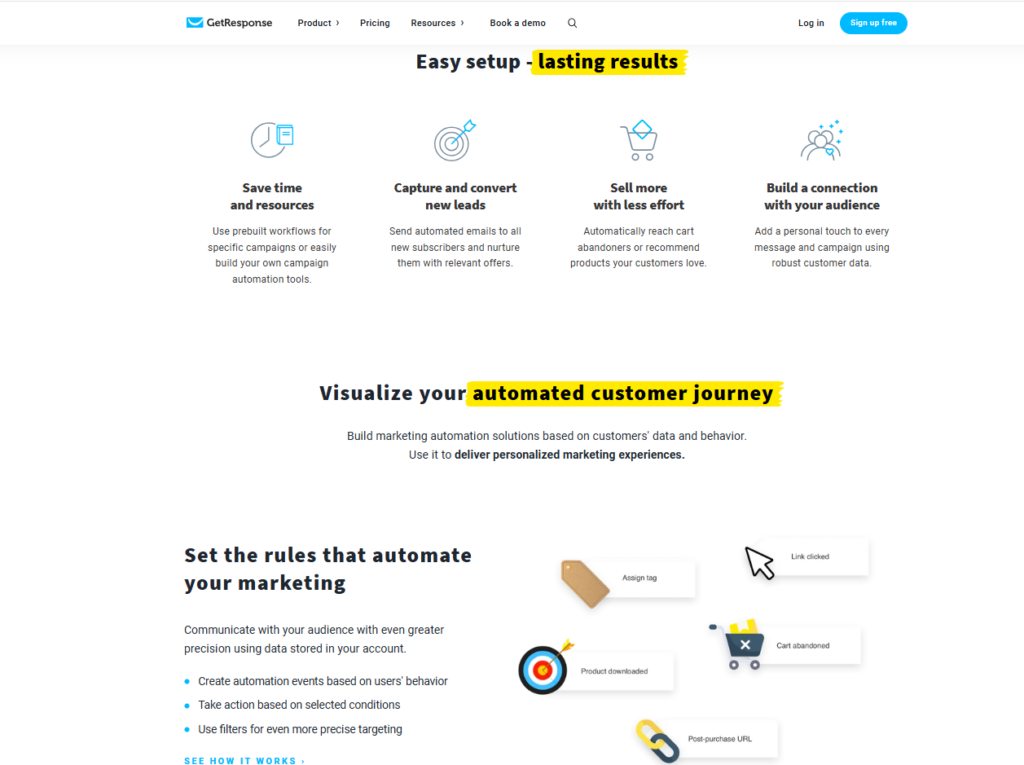
GetResponse offers a visual automation builder that provides an expansive, flexible interface for mapping complex customer journeys. Triggers are not limited to list subscriptions; they can also be based on specific URLs visited, abandoned carts, or a lead’s scoring level.
A notable 2026 feature of GetResponse is the AI Workflow Generator. Users can describe the objective of a campaign, such as “Nurture new leads who have not purchased in seven days,” and the AI constructs the entire logic tree, including time delays and conditional splits, within seconds.
Comparison of Automation Capabilities
MailerLite provides sufficient automation capabilities for most content creators and small businesses, offering a straightforward user experience. In contrast, GetResponse is better suited for advanced marketers who require behavioral tracking and lead scoring to manage complex sales funnels.
Pricing Plans & Value for Money
Pricing is often the deciding factor when comparing MailerLite and GetResponse. In 2026, both platforms updated their pricing to align with the shift from basic email tools to comprehensive, AI-driven marketing suites.
MailerLite: The Budget-Friendly Powerhouse
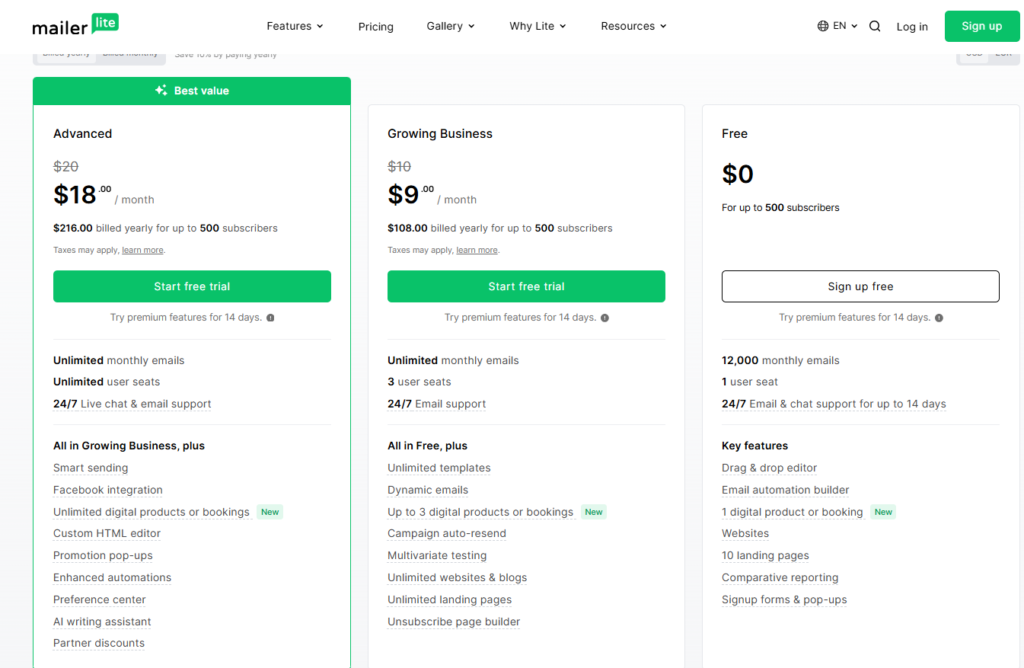
MailerLite is a preferred choice for budget-conscious creators and small businesses. Its pricing is transparent and adjusts solely according to subscriber count.
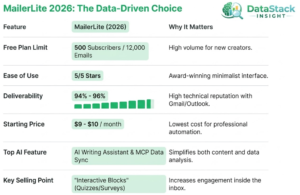
- Free Plan: Supports up to 500 subscribers and 12,000 monthly emails. Notably, it remains one of the few free plans in 2026 to include automation and landing pages.
- Growing Business: Begins at $10 per month for 500 subscribers. This tier removes MailerLite branding and provides unlimited emails and 24/7 email support.
- Advanced: Starts at $20 per month. This plan includes advanced features such as the AI writing assistant, custom HTML editor, and live chat support.
GetResponse: Comprehensive Features at a Higher Price
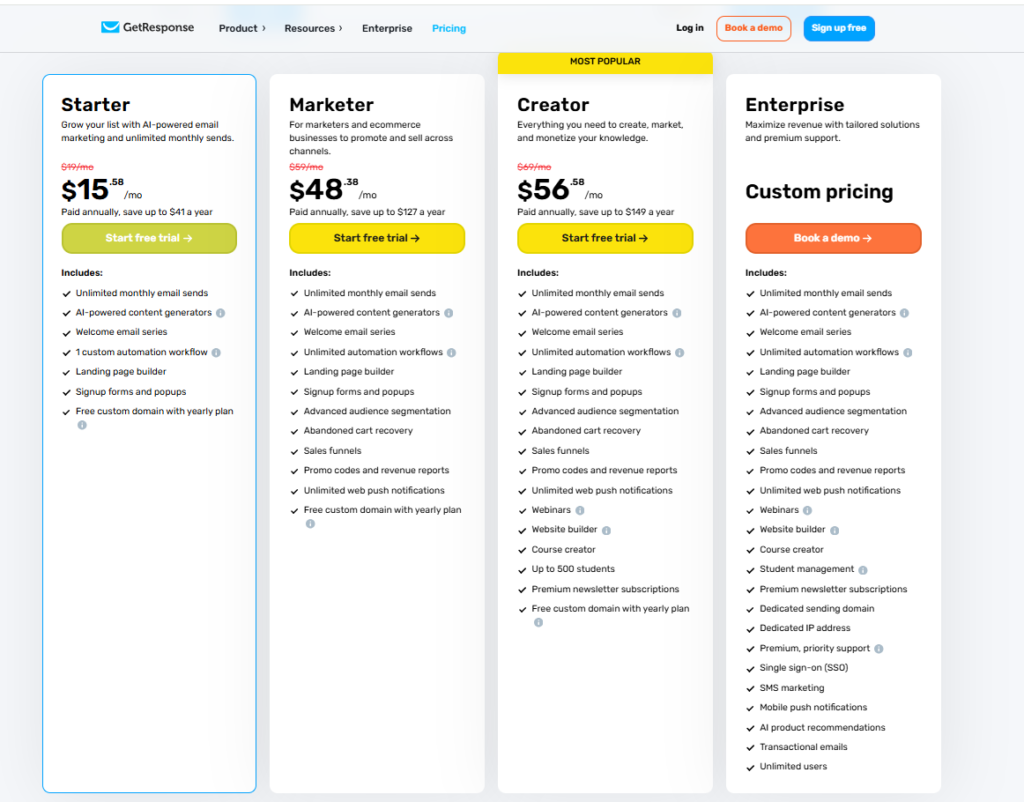
GetResponse is positioned as a mid- to high-tier solution. While its entry-level pricing is competitive, costs rise as additional features such as webinars and automated sales funnels are added.
- Free Plan: Supports up to 500 contacts with unlimited newsletters, but does not include advanced automation or AI features available in paid plans.
- Email Marketing: Starts at $19 per month for 1,000 subscribers. This tier is suitable for users seeking basic email marketing and high deliverability.
- Marketing Automation: Starts at $59 per month. This popular tier includes the visual automation builder and webinar hosting.
- Ecommerce Marketing: Starts at $119 per month. This plan is designed for established sellers and includes abandoned cart recovery and product recommendations.
The Verdict on Value
For the most competitive per-subscriber pricing, MailerLite is the clear choice. Its Advanced plan supports 10,000 subscribers for approximately $110 per month, while GetResponse’s Automation tier for similar volume begins at around $114 per month. However, if GetResponse enables you to consolidate webinar and funnel software, it may provide greater overall value for your technology stack.
AI Content & Strategy Tools
In 2026, the comparison between MailerLite vs GetResponse centers on AI capabilities rather than drag-and-drop editors. Both platforms have adopted an AI-first approach, but each leverages artificial intelligence differently to support copywriting and strategic planning.
MailerLite: The “AI Assistant” Approach
MailerLite enhances your current workflow with its integrated AI Writing Assistant within the email editor. This tool helps generate subject lines, rewrite content for different tones, and correct grammar in real time.
Mailerlite’s key innovation in 2026 is its MCP (Model Context Protocol) Server, which connects your account data to external AI tools such as ChatGPT or Claude. This enables you to query your campaign performance directly, transforming your email data into actionable insights.

GetResponse: The “AI Generator” Approach
GetResponse advances AI integration with full-scale AI Campaign Generation. By providing your industry and campaign goals, the platform can generate complete marketing assets, including email layouts, copy, and recommended images, from a single prompt.
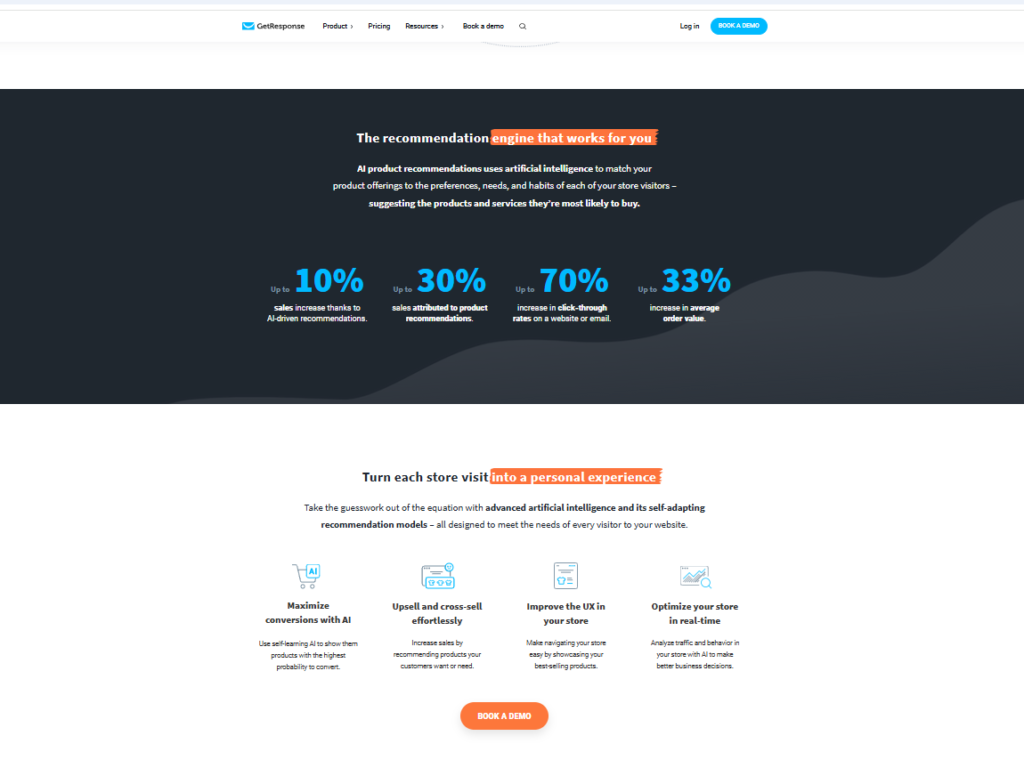
GetResponse also offers advanced AI-driven strategy tools. Its self-learning AI Recommendation Engine for e-commerce tracks subscriber behavior and inserts personalized product recommendations into emails. Additionally, its AI-driven Send-Time Optimization tool schedules emails to reach subscribers when they are most likely to engage.
The Verdict on AI Tools
If you prefer an AI that serves as an editor and data analyst to refine your ideas, MailerLite offers greater flexibility. For automated campaign creation and advanced e-commerce strategy, GetResponse provides more robust capabilities.
Email Deliverability Rates
An effective email is only valuable if it reaches the inbox. In the MailerLite vs GetResponse deliverability comparison, both platforms have focused in 2026 on technical compliance and AI-driven reputation management to address increasingly strict filters from Gmail and Outlook.
MailerLite: Consistent and Transparent
MailerLite has established a strong reputation for high deliverability by carefully vetting new users. Their strict manual approval process ensures shared IP addresses remain clean, benefiting all users.
Recent 2026 industry tests show MailerLite consistently achieves a deliverability rate of 94% to 96%. Their dashboard monitors Sender Health, providing a green, yellow, or red status based on bounce and complaint rates. This allows non-technical users to easily assess how list hygiene impacts performance.
GetResponse: Enterprise-Grade Infrastructure
GetResponse’s large scale provides extensive data insights into ISP behavior. Their proprietary AI system, Hydra, analyzes emails in real time to predict the likelihood of being flagged as spam before sending.
GetResponse’s average deliverability typically ranges from 91% to 93%, slightly lower than MailerLite in some cases. However, they offer advanced tools for improving sender reputation, including automated bounce management and the option to purchase a Dedicated IP on higher tiers. This is essential for high-volume senders seeking full control over their reputation.
The Verdict on Deliverability
For smaller, highly engaged lists, MailerLite typically delivers better out-of-the-box results. For large-scale operations or businesses with past deliverability challenges, GetResponse offers robust infrastructure and AI-driven tools to support long-term inbox placement.
Landing Pages & Website Builders
MailerLite and GetResponse have evolved beyond email marketing to become comprehensive no-code web design platforms. In 2026, both support everything from basic lead capture pages to full business websites. Your choice should be guided by the level of integrated marketing features you require.
MailerLite: Modern Design for Quick Launches
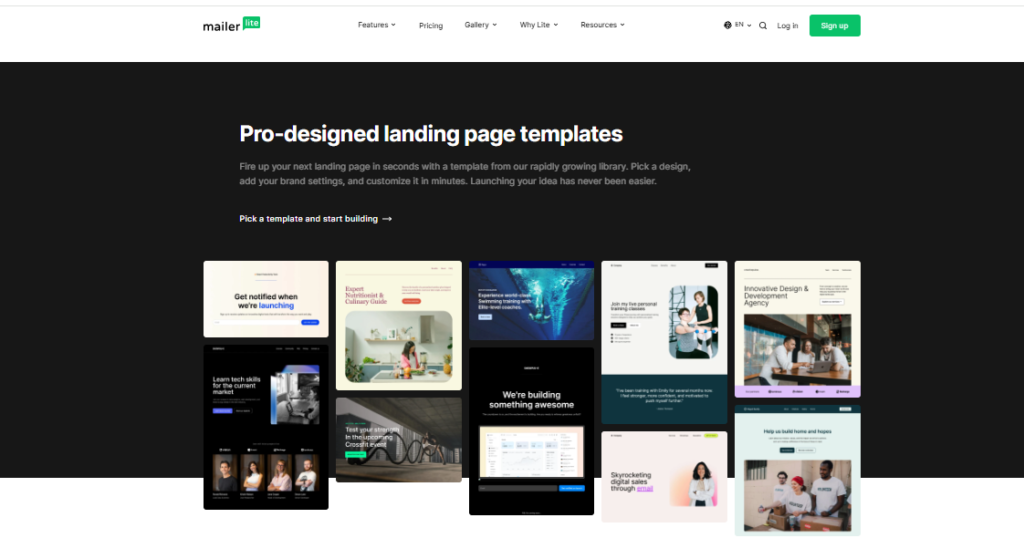
MailerLite’s landing page builder appeals to users who prioritize clean, modern design. It provides over 70 professionally designed blocks, allowing you to create a range of pages, from “Coming Soon” announcements to product launches.
In 2026, MailerLite’s AI Landing Page Generator enables users to create fully structured pages from a simple prompt within seconds. The platform also offers built-in SEO tools, A/B testing with up to five variations, and heatmaps for visitor analytics. The “Growing Business” plan and higher tiers support multi-page websites with blogs, making it especially valuable for solopreneurs.
GetResponse: Advanced Tools for Conversion-Focused Marketing
GetResponse’s builder is designed to maximize conversions. In addition to a robust AI website wizard and more than 200 templates, its primary advantage is the ability to embed features such as Live Chat, Webinars, and Web Push Notifications directly into landing pages without third-party plugins.
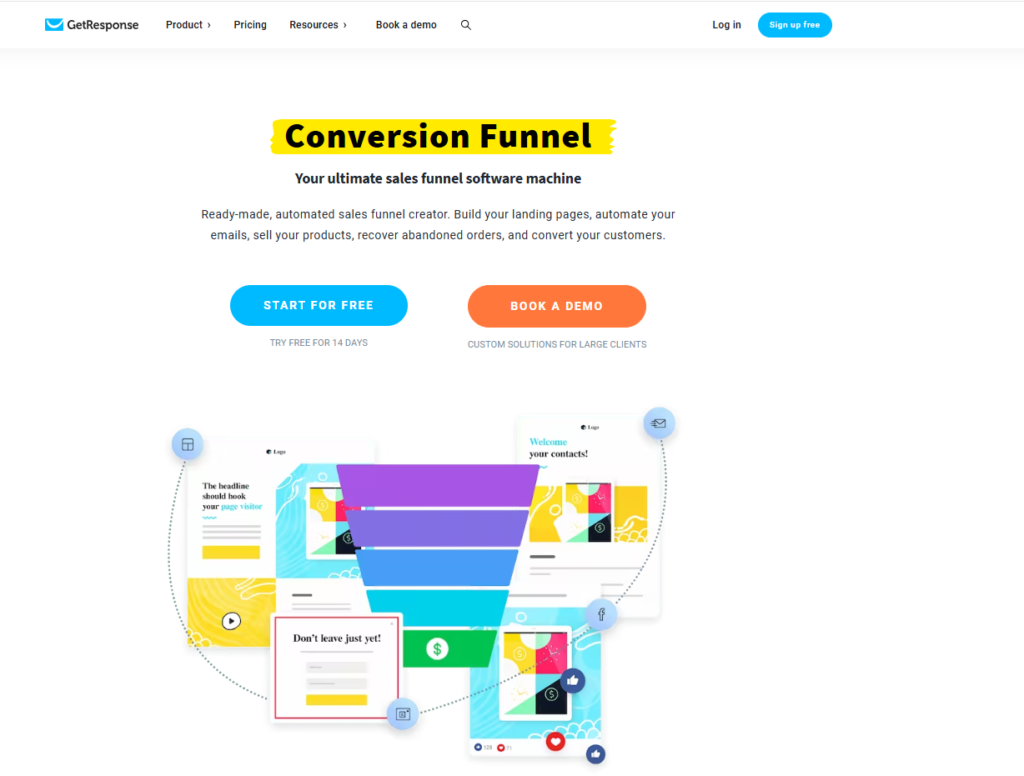
In 2026, GetResponse introduced Advanced Web Automations, enabling pages to respond to visitor behavior in real time. For instance, if a visitor is about to leave without signing up, the page can trigger a workflow to display a last-minute discount. Landing pages also integrate with “Conversion Funnels,” which map the entire customer journey from advertisement to sale.

The Verdict on Page Building
If you want a beautiful, fast-loading site that feels modern and is easy to maintain, MailerLite is the better choice. However, if you are building a sales funnel that requires advanced tools such as live chat, webinars, and complex behavioral tracking, GetResponse offers a more powerful integrated suite.
E-commerce Features & Integrations
For online sellers, choosing between MailerLite vs GetResponse depends on whether you need a straightforward purchase option or a comprehensive e-commerce solution. As of 2026, both platforms support direct sales, but each manages the checkout process differently.
MailerLite: The Lightweight Selling Machine
MailerLite is well-suited for creators and small businesses seeking a simple sales solution. Its native Stripe integration enables direct sales of digital products such as e-books, paid newsletters, or coaching sessions on landing pages.
For users of Shopify or WooCommerce, MailerLite’s 2026 updates provide near-instant data syncing. Product Blocks can be added to newsletters, automatically importing images, descriptions, and prices from your store. Essential features such as abandoned cart emails, post-purchase upsells, and first-time customer segments are easy to implement using pre-built templates.
GetResponse: The Enterprise-Level Sales Suite
GetResponse is designed for high-volume e-commerce operations. In addition to standard integrations, it offers a dedicated Ecommerce Suite with advanced tools such as AI-driven product recommendations. This feature analyzes customer behavior to suggest relevant products directly within emails.
GetResponse also features Promo Code Sync, enabling you to generate discount codes in your e-commerce platform and sync them directly to GetResponse. This allows for the inclusion of unique, trackable coupons in automated workflows. Additionally, Conversion Funnels offer a comprehensive overview of the entire sales process, from the initial ad click to payment confirmation, within a single dashboard.

The Verdict on E-commerce
MailerLite is recommended for those seeking a quick, cost-effective solution to sell a limited range of products or to integrate a basic Shopify store. GetResponse is better suited for growing e-commerce brands that require advanced features such as AI recommendations, native promo codes, and comprehensive sales funnel tracking.
Webinars & Event Marketing
If you intend to use live video for product sales or audience education, the MailerLite and GetResponse comparison is straightforward. One platform treats webinars as an external integration, while the other considers them central to its marketing ecosystem.
MailerLite: Simple Integration, No Native Hosting
As of 2026, MailerLite remains focused on email marketing and does not offer native webinar hosting. To run a webinar, you must use a third-party service such as Zoom, Livestorm, or eWebinar.
MailerLite streamlines event promotion with its 2026 update, which introduces dedicated Webinar Integration Blocks in the email editor. After connecting your external accounts, you can add a block to your email that automatically includes the event title, date, and a “Register” button. MailerLite manages invitations and follow-up replays, but the live broadcast itself takes place on the third-party platform.
GetResponse: A Built-In Broadcasting Suite
GetResponse is one of the few major email service providers with a professional-grade webinar platform built into your account. No separate Zoom subscription is required; all webinar activities occur within the GetResponse ecosystem.
For 2026, GetResponse offers an extensive feature set, including:
- No-Download Entrance: Attendees can join directly from their mobile or desktop browsers.
- Interactive Tools: Built-in whiteboards, screen sharing, and live polls to keep your audience engaged.
- On-Demand Webinars: Set up “evergreen” webinars that play automatically for new subscribers, generating leads continuously.
- Native One-Click Registration: With built-in webinars, you can include “one-click” registration buttons in your emails. Subscribers do not need to complete a form, as GetResponse already has their information.

The Verdict on Webinars
If you host webinars infrequently, MailerLite combined with a free Zoom account is the most cost-effective option. However, if webinars are central to your sales funnel, GetResponse is the superior choice. Its integrated reporting allows you to track attendance, engagement duration, and user interactions within your email reports, offering a level of data integration that MailerLite does not provide.
Reporting & Advanced Analytics
To accurately assess your marketing impact, it is important to look beyond open rates. In comparing MailerLite vs GetResponse, the decision is between straightforward, actionable insights and comprehensive, multi-channel analytics. By 2026, both platforms will have integrated AI to support data interpretation, but each serves distinct analytical requirements.
MailerLite: Clear, Actionable Reporting
MailerLite presents data in a clear, accessible format. Its reporting dashboard is recognized for its streamlined design, displaying essential metrics without unnecessary detail. Key indicators such as open rates, click-through rates (CTR), and unsubscribes are shown in straightforward visual graphs.
In 2026, the Click Map feature offers a visual overlay of your email, indicating precisely where subscribers clicked, including images, text links, and main CTA buttons. MailerLite’s Model Context Protocol (MCP) integration also enables users to interact with data through natural language prompts, such as “Which automation had the highest conversion rate last month?”, providing immediate insights and optimization recommendations.

GetResponse: The Deep Data Engine
GetResponse is designed for marketers who want to track the entire customer journey. Its reporting goes significantly deeper than MailerLite’s, tracking Conversion Funnels in real time. You can see exactly where prospects are dropping off in your sales process—from the initial landing page visit to the final payment confirmation.
In 2026, GetResponse’s AI-Powered Predictive Analytics has become a game-changer. It can predict the “churn risk” of individual subscribers and suggest the “Perfect Timing” for future sends based on each person’s unique historical behavior. For e-commerce users, GetResponse provides a detailed ROI dashboard that calculates the exact dollar value generated by each campaign, making it easy to justify your marketing spend.
The Verdict on Analytics
If you want fast, visual reports that show how your newsletters are performing, so you can get back to creating, MailerLite is the perfect fit. However, if you need advanced funnel tracking and ROI calculations to manage a complex sales machine, GetResponse provides the professional-grade data you need.
Customer Support & Resources
Reliable support is essential for marketers when issues arise. In comparing MailerLite vs GetResponse, the level of support depends on your subscription. By 2026, both companies have adopted AI-first support models, though access to human assistance still varies by plan.
MailerLite: Consistent, High-Quality Support
MailerLite is recognized for its people-first approach. As of 2026, it maintains a 97% customer satisfaction rate, largely due to a support team of experienced professionals rather than automated bots.
- Free Plan Support: MailerLite offers 24/7 email support on its free tier, although response times may be slower than on paid plans.
- “Growing Business” Perk: Upgrading to a paid plan provides 24/7 live chat support, with average response times under five minutes
- Self-Service: MailerLite Academy provides free, high-quality certification courses covering both platform usage and broader email marketing skills.
GetResponse: Multi-Channel, Multi-Lingual Support
GetResponse provides a corporate-grade support structure. Support is available in over eight languages, making it well-suited for international teams.
- Tiered Support: All users receive 24/7 live chat and email support, while the “Ecommerce” and “MAX” plans include Priority Support.
- Phone Support: GetResponse offers phone support exclusively to Enterprise-level “MAX” customers.
- Learning Resources: GetResponse University offers in-depth courses on advanced topics such as webinar marketing and sales funnel optimization, which are more technical than MailerLite’s creative-focused courses.
The Verdict on Support
For solopreneurs seeking efficient, friendly support at an affordable price, MailerLite is the stronger choice. Its live chat on the basic paid plan is highly responsive. For larger organizations needing multi-language support or dedicated account management by phone, GetResponse is better equipped to meet enterprise requirements.
Conclusion: Which One Should You Choose in 2026?
The conclusion is critical for converting readers in your MailerLite vs GetResponse comparison. Many users skip to the end for your recommendation, so ensure it is clear, authoritative, and easy to scan.
Choosing between MailerLite vs GetResponse depends on your marketing strategy’s complexity and your budget. Both platforms have recently integrated AI to improve workflows, but each serves a distinct audience.
Choose MailerLite if:
- You are a solopreneur or small business seeking an intuitive tool that requires minimal training.
- Budget is your top priority: With paid plans starting around $9–$10/month, MailerLite remains the most affordable way to access professional automation.
- You want clean, modern design: Their “block-based” editor and minimalist templates make it nearly impossible to create an “ugly” email.
Choose GetResponse if:
- You need an all-in-one sales machine: If you want webinars, a built-in CRM, and advanced “Conversion Funnels” under one roof, GetResponse is the winner.
- You run a scaling E-commerce store: The advanced triggers (such as behavioral tracking and automated promo code syncing) give high-volume sellers more power.
- You want AI to build your assets: GetResponse’s AI campaign generator is currently more advanced, capable of building entire landing pages and email sequences from a single prompt.
Final Verdict
For most bloggers, authors, and small service providers, MailerLite is the best choice due to its balance of simplicity and price. However, if you are scaling a digital product business or need to host live webinars to sell your courses, the higher investment in GetResponse will pay for itself in consolidated tool costs and advanced automation.
Your choice between MailerLite vs GetResponse hinges on the complexity of your marketing strategy and financial considerations. While MailerLite offers a user-friendly experience ideal for bloggers and small service providers, GetResponse stands out for those aiming to scale digital products or conduct webinars, justifying its higher price with advanced features and integrated tools.